![Featured image of post Debian 网关 [Episode 02]: 配置网络接口](/post/b04fa8dd/cover_hue7d633b2d7f5b1b6e95a4af2800a9c85_31928_800x0_resize_box_3.png)
更新日志:
- 2023-04-20 将 DHCP 服务器变更为 dnsmasq 以获取更多的功能
结构
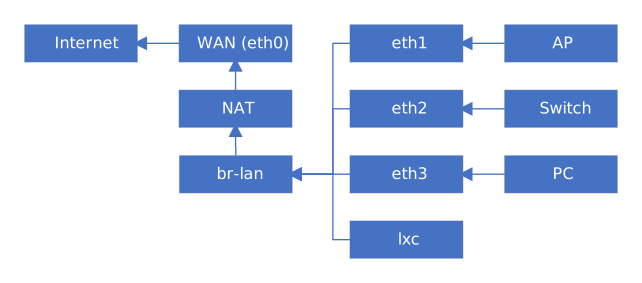
接口配置
- Tips:
*.link、*.netdev配置需要重启生效- 对于未配置的接口,使用
sudo networkctl reload进行配置 - 对于已配置的接口,使用
sudo networkctl reconfigure <name>进行重新配置 - 建议:
*.link使用00-前缀*.netdev使用10-前缀*.network使用20-前缀- 具体视情况而定
[选] 接口改名
- 例: 将 MAC 为
00:15:5d:01:78:01的接口改名为eth0并将 MAC 修改为00:15:5d:01:00:01 - 创建并编辑
/etc/systemd/network/00-eth0.link
1[Match]
2MACAddress=00:15:5d:01:78:01
3
4[Link]
5Name=eth0
WAN 口启用 DHCP 获取 IP
- 无论是
动态IP上网,亦或者是PPPoE拨号,都建议开启 DHCP,以便于访问光猫或上游设备 - 以
eth0为例 - 创建并编辑
/etc/systemd/network/20-eth0.network
1[Match]
2Name=eth0
3
4# [可选] 此节为 MAC 地址覆写 (即为 MAC 地址克隆)
5[Link]
6MACAddress=00:15:5d:01:00:01
7
8[Network]
9DHCP=yes
设置本机 DNS
1echo "nameserver 114.114.114.114" | \
2sudo tee /etc/resolv.conf
创建 br-lan 网桥
创建网桥设备
- 创建并编辑
/etc/systemd/network/10-br-lan.netdev MACAddress为可选项
1[NetDev]
2Name=br-lan
3Kind=bridge
4MACAddress=00:e2:69:75:f0:06
设置 LAN 侧 IP
- 创建并编辑
/etc/systemd/network/20-br-lan.network
 1[Match]
 2Name=br-lan
 3
 4[Link]
 5RequiredForOnline=no
 6ActivationPolicy=always-up
 7ARP=yes
 8
 9[Network]
10Address=192.168.64.1/24
11ConfigureWithoutCarrier=yes
将物理网口绑定到网桥
- 创建并编辑
/etc/systemd/network/20-br-lan-bind.network
1[Match]
2Name=eth1
3Name=eth2
4Name=eth3
5
6[Network]
7Bridge=br-lan
至此,可将 /etc/systemd/network/01-dhcp.network 安全的删除
PPPoE 拨号
- 安装 ppp
1# Debian
2sudo apt install -y ppp
3# Arch Linux
4sudo pacman -Sy ppp
如果在 LXC 容器中使用 ppp 设备
sudo lxc-device add -n <name> /dev/ppp /dev/ppp
创建拨号配置
- 以中国电信为例
- 创建并编辑
/etc/ppp/peers/telecom
 1plugin pppoe.so
 2eth0
 3
 4# Username, Password
 5name "xxxxxxxxxxx"
 6password "xxxxxx"
 7
 8noauth
 9pap-timeout 10
10hide-password
11ifname ppp-telecom
12
13# Default Route
14defaultroute
15replacedefaultroute
16ipv6cp-accept-local
17
18# Detect Link Status
19lcp-echo-interval 5
20lcp-echo-failure 3
自动拨号
对于 Arch Linux
- 创建并编辑
/etc/systemd/system/ppp@.service.d/override.conf
1[Unit]
2After=systemd-networkd.service
3
4[Service]
5Restart=always
6RestartSec=30
7StartLimitInterval=0
- 随后使用
systemctl启用ppp@telecom.service即可
对于 Debian
- 创建并编辑
/etc/systemd/system/ppp-telecom.service
 1[Unit]
 2Description=PPP link to Telecom
 3Before=network.target
 4After=systemd-networkd.service
 5
 6[Service]
 7ExecStart=/usr/sbin/pppd call telecom nodetach nolog
 8Restart=always
 9RestartSec=30
10StartLimitInterval=0
11
12[Install]
13WantedBy=multi-user.target
- 随后使用
systemctl启用ppp-telecom.service即可
IPv6 配置
PPPoE 接口 networkd 配置
 1# /etc/systemd/network/20-ppp-telecom.network
 2[Match]
 3Name=ppp-telecom
 4
 5[Network]
 6# Keep ipcp IPv4
 7KeepConfiguration=static
 8# DHCPv6-PD Client
 9DHCP=ipv6
10IPv6AcceptRA=no
11DHCPPrefixDelegation=yes
12# Default Route
13DefaultRouteOnDevice=yes
14
15[DHCPPrefixDelegation]
16UplinkInterface=:self
17#SubnetId=0x0
18Announce=no
br-lan 下发 IPv6
省略上文已配置内容
 1# /etc/systemd/network/20-br-lan.network
 2[Match]
 3Name=br-lan
 4
 5[Network]
 6DHCPPrefixDelegation=yes
 7IPv6SendRA=yes
 8
 9[IPv6SendRA]
10DNS=_link_local
11
12[DHCPPrefixDelegation]
13UplinkInterface=:auto
14Announce=yes