预览
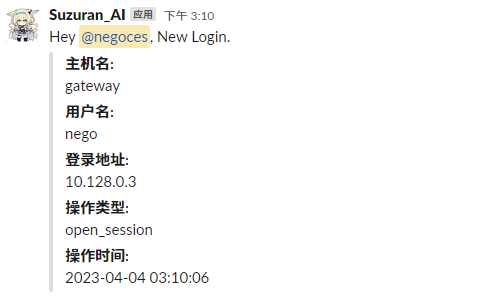
部署
源码 (Golang)
替换 line 12-14 的内容
- token: 前往 https://api.slack.com/apps 创建 App, 在 Settings -> Installed App 中获取
- channel_id: 在频道详细信息的最下方获取
- user_id: 在用户档案里的 复制成员 ID 获取
 1package main
 2
 3import (
 4	"os"
 5	"time"
 6
 7	"github.com/slack-go/slack"
 8)
 9
10func main() {
11	hostname, _ := os.Hostname()
12	var bot_token string = "token"
13	var channel_id string = "频道名/频道ID"
14	var user_id string = "用户ID"
15	var msg_content string = "Hey <@" + user_id + ">, New Login."
16	var attachment slack.Attachment = slack.Attachment{
17		Fields: []slack.AttachmentField{
18			{
19				Title: "主机名:",
20				Value: hostname,
21			}, {
22				Title: "用户名:",
23				Value: os.Getenv("PAM_USER"),
24			}, {
25				Title: "登录地址:",
26				Value: os.Getenv("PAM_RHOST"),
27			}, {
28				Title: "操作类型:",
29				Value: os.Getenv("PAM_TYPE"),
30			}, {
31				Title: "操作时间:",
32				Value: time.Now().Format("2006-01-02 03:04:05"),
33			},
34		},
35	}
36	api := slack.New(bot_token)
37	api.PostMessage(channel_id, slack.MsgOptionText(msg_content, false), slack.MsgOptionAttachments(attachment))
38}
编译
1go build -ldflags "-s -w"
编译完成后移动到你喜欢的路径,文章以 /opt/bin/watchdog 为例
Hook
编辑 /etc/pam.d/sshd, 追加:
1session optional pam_exec.so seteuid /opt/bin/watchdog
完事!